Unlocking Digital Magic: A Guide to the Mystic Crystal Procreate Brush Stamps
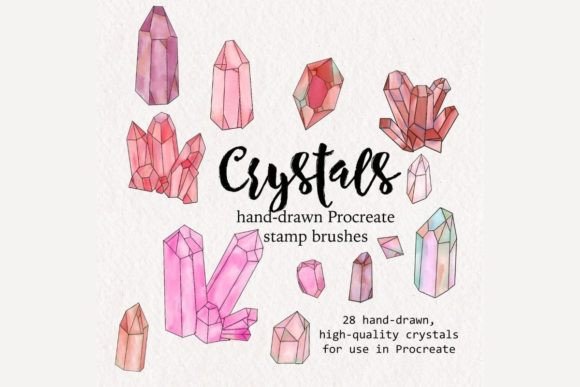
In the rapidly evolving world of digital art, efficiency and aesthetic quality are paramount. For artists using the iPad-based application Procreate, finding the right tools can transform a good illustration into a masterpiece. One such tool that has gained significant traction among illustrators is the Mystic Crystal Collection. This set of 28 high-quality crystal brush stamps offers a unique blend of hand-drawn charm and digital flexibility, allowing creators to incorporate intricate geological forms into their work with ease.
Whether you are a seasoned professional illustrator or a beginner just starting your digital journey, understanding how these brushes function and where they fit into your workflow is essential. This article explores the purpose, significance, and practical application of crystal Procreate brush stamps, helping you maximize their potential in your creative projects.
What Are Procreate Brush Stamps?
Before diving into the specifics of the crystal collection, it is important to understand what a "brush stamp" actually is. In traditional painting, a brush applies pigment continuously as you move it across a canvas. In digital art, specifically within Procreate, a stamp brush works differently. Instead of creating a continuous line, each tap of the Apple Pencil places a pre-designed image—or "stamp"—onto your canvas.
Think of it like using a physical rubber stamp, but with infinite versatility. When you use the Mystic Crystal Collection, every time you tap the screen, a beautifully hand-drawn crystal, geode, or gem appears. These are not static images; they are dynamic digital assets that can be resized, rotated, recolored, and layered instantly. This technology bridges the gap between complex manual drawing and efficient digital composition.
The Significance of Hand-Drawn Quality
One might ask, why use hand-drawn stamps when digital tools can generate perfect geometric shapes? The answer lies in organic authenticity. The crystals in this set are not computer-generated vectors with cold, perfect lines. They are hand-drawn, meaning they possess natural irregularities, textures, and artistic flair that mimic real-life mineral formations. This adds a layer of warmth and personality to illustrations that purely algorithmic shapes often lack.
For modern illustrators, this distinction is crucial. Audiences today crave content that feels human and authentic. By using high-quality, hand-drawn assets, artists can maintain their unique style while speeding up their workflow. It allows for the creation of complex scenes—such as a magical forest filled with glowing quartz or a fantasy character holding a rare geode—without spending hours drawing each individual stone from scratch.
Practical Applications in Modern Creativity
The versatility of the Crystal Procreate Brush Stamps extends far beyond simple decoration. These tools have become indispensable in various sectors of the creative industry, including graphic design, game development, and educational content creation.
- Fantasy Illustration: Ideal for creating magical environments, treasure hoards, or enchanted artifacts.
- Greeting Card Design: Add elegant touches of quartz or gems to birthday, wedding, or holiday cards.
- Tattoo Design: Artists can quickly mock up crystal placements on digital body templates before committing to ink.
- Educational Materials: Science teachers and textbook illustrators can use these accurate representations of geodes and clusters to explain geological concepts visually.
By integrating these brushes into your toolkit, you are not just saving time; you are expanding your creative vocabulary. You can experiment with compositions that would previously have been too time-consuming to attempt, allowing for greater artistic risk-taking and innovation.
Understanding the Product: What You Receive
When you purchase the Mystic Crystal Collection, it is vital to understand the nature of the transaction. You are buying digital assets, not physical goods. Nothing will be mailed to your doorstep. Instead, you will receive digital files that you download directly to your device.
The package includes:
- 28 High-Quality Crystal Brushes: Delivered in the
.brushsetformat, which is native to Procreate. This format ensures that all 28 brushes are installed simultaneously with a single tap, preserving their settings and organization. - Installation Instructions: A comprehensive
.pdfguide that walks you through the process of importing the brushes into your Procreate library. This is particularly helpful for beginners who may be unfamiliar with file management on iOS. - Modification Guide: Tips on how to adjust size, position, and color to suit your specific artistic needs.
Note: You must have the Procreate app installed on your iPad to use these brushes. They are not compatible with other software like Photoshop or Clip Studio Paint unless you export the individual stamps as images, which defeats the purpose of the dynamic brush engine.
How to Use and Modify Crystal Stamps
The true power of these brushes lies in their modifiability. Once installed, using them is intuitive, but mastering their customization can elevate your art. Here is a step-by-step approach to getting the most out of your new tools.
Step 1: Installation
After downloading the .brushset file, open it on your iPad. Procreate should automatically launch and import the brushes into a new folder at the top of your brush library. If this does not happen, refer to the included .pdf instructions for manual import steps via the "Import" button in the brush panel.
Step 2: Basic Application
Select a crystal brush from your library. Choose a base color from your palette. Tap anywhere on your canvas to place a crystal. Notice how the stamp retains its detailed shading and texture regardless of the base color you choose. This is because the brushes are designed with transparency and blending modes in mind.
Step 3: Customization
To truly make the crystals your own, utilize Procreate’s transformation tools:
- Resize: Use two fingers to pinch and zoom on the stamp immediately after placing it, or use the Transform tool (arrow icon) to scale it up or down without losing quality.
- Rotate: Crystals look different from various angles. Rotate your stamps to create variety and avoid repetitive patterns.
- Recolor: Use the "Hue, Saturation, Brightness" adjustment layer to shift the color of your crystals. Turn a clear quartz into an amethyst with a few sliders, or make a gem glow with neon hues.
- Layering: Place multiple stamps on different layers. Use clipping masks to add shadows or highlights that interact with the rest of your illustration.
Common Misunderstandings and Clarifications
New users often have questions about the limitations and capabilities of digital brush sets. Let’s clarify some common assumptions.
Misconception 1: "These are just static images."
While the core shape is pre-drawn, the integration with Procreate’s engine means they behave like dynamic objects. You can change their opacity, blend modes (such as Multiply or Screen), and apply effects like Gaussian Blur to create depth of field.
Misconception 2: "I need advanced drawing skills to use these."
On the contrary, these brushes are designed to be accessible. Beginners can create professional-looking compositions by simply arranging the stamps. However, experienced artists will appreciate the time saved on rendering complex textures, allowing them to focus on lighting and composition.
Misconception 3: "They only work in one style."
The Mystic Crystal Collection features a versatile hand-drawn style that fits well with watercolor, ink, flat design, and semi-realistic illustrations. By adjusting the opacity and combining them with other brushes, you can adapt them to virtually any artistic style.
Why This Collection Matters for Your Workflow
In the fast-paced environment of modern digital content creation, time is a valuable resource. The Crystal Procreate Brush Stamps are not just about aesthetics; they are about workflow optimization. By reducing the time spent on repetitive, detailed elements, artists can allocate more energy to storytelling, character design, and overall composition.
Furthermore, using high-quality, legally purchased assets supports the ecosystem of digital artists who create these tools. It encourages the continued development of innovative resources that benefit the entire creative community.
Conclusion
The Mystic Crystal Collection represents a perfect fusion of traditional artistic sensibility and modern digital convenience. With 28 hand-drawn, high-quality brushes, it offers illustrators a powerful way to enhance their work with minimal effort. Whether you are designing a fantasy book cover, creating social media graphics, or simply exploring your creativity, these crystal stamps provide the flexibility and beauty needed to bring your vision to life.
Remember, the key to mastering these tools lies in experimentation. Play with colors, sizes, and layers. Don’t be afraid to modify the stamps to fit your unique style. By integrating these resources into your Procreate workflow, you unlock new possibilities for efficiency and artistic expression. Download the set, follow the easy installation instructions, and start adding a touch of mystical sparkle to your digital illustrations today.