Storybook Kit for Procreate: A Practical Guide to Streamlining Children’s Illustration Workflows
For illustrators, educators, and content creators, the gap between a conceptual idea and a polished children’s book can often feel insurmountable. The technical overhead of setting up canvases, selecting appropriate brushes, and maintaining stylistic consistency frequently consumes more time than the actual drawing process. This is where a specialized toolset becomes not just a luxury, but a necessity for efficient production. The Storybook Kit for Procreate addresses these friction points by providing a curated ecosystem designed specifically for narrative illustration. It is not merely a collection of digital assets; it is a workflow accelerator that allows artists to focus on storytelling rather than software configuration.
Whether you are a professional illustrator managing tight deadlines, an entrepreneur creating branded content, or a hobbyist looking to structure your creative practice, integrating a purpose-built kit into your routine can significantly enhance output quality and consistency. This article explores how to effectively implement this kit into your existing creative pipeline, ensuring you maximize its utility from preparation to final export.
Integrating the Kit into Your Creative Pipeline
Successful digital illustration relies heavily on preparation. Many artists struggle with "blank canvas syndrome" or waste valuable hours tweaking brush settings to achieve a specific texture. The Storybook Kit for Procreate mitigates this by offering pre-configured tools that align with the aesthetic demands of children’s literature. By adopting this kit at the beginning of your project lifecycle, you establish a standardized foundation for your work.
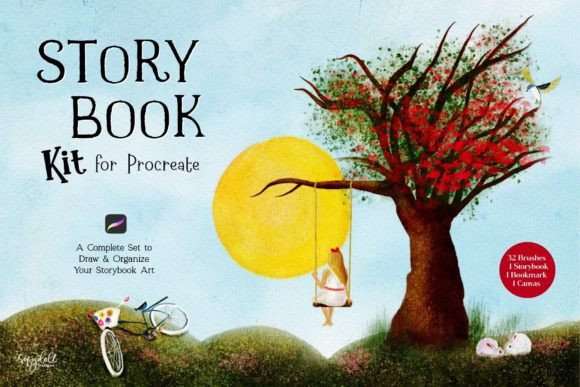
Before you begin sketching, it is crucial to understand the components included in the set. The kit features 32 custom brushes, each crafted to provide unique, fun elements that bring illustrations to life. These are not generic tools; they are engineered to mimic traditional media while leveraging the flexibility of digital platforms. Additionally, the inclusion of a digital storybook template (8.5″ x 11″) and a customizable bookmark serves as both a functional workspace and a psychological trigger, helping you enter a focused, fairytale-inspired mindset.
To integrate this effectively, start by organizing your Procreate library. Create a dedicated folder for your storybook projects and import the kit immediately. This ensures that every time you start a new narrative piece, your tools are consistent. Consistency is key for professionals who need to maintain a recognizable style across multiple pages or even multiple books. By using the same brush set and canvas textures, you reduce the cognitive load associated with technical decisions, allowing your brain to focus entirely on composition and character development.
Leveraging the Digital Storybook Template
One of the most practical features of this kit is the included digital Procreate storybook. Sized at 8.5″ x 11″, this template is optimized for standard printing dimensions, which is critical for creators planning to publish physical copies. However, its value extends beyond mere dimensions. The template is designed to work with Procreate’s ‘page assist’ feature, available in version 5.2 and later.
For those unfamiliar, page assist transforms the linear canvas experience into a book-like interface. This allows you to flip through pages naturally, providing a realistic preview of how your illustrations will read in sequence. To utilize this, ensure your iPad is running the latest version of Procreate. Once enabled, you can drag and drop your artwork directly onto the pages, adjusting layout and pacing in real-time. This interaction between the template and the software’s native features streamlines the pagination process, which is traditionally one of the most tedious aspects of book creation.
From a workflow perspective, this means you can move from sketching to dummy-book creation without exporting files to external layout software like InDesign until the final stages. This immediate feedback loop allows for quicker iterations. You can assess visual rhythm, check for continuity errors in character design, and adjust text placement before committing to high-resolution renders. For educators and marketers, this rapid prototyping capability is invaluable for creating engaging visual stories for presentations or social media carousels.
Optimizing Brush Usage for Efficiency and Style
The 32 brushes included in the Storybook Kit for Procreate are the core engine of your artistic expression. However, simply having them is not enough; understanding how to deploy them strategically is what separates amateur attempts from professional results. Each brush has been carefully crafted to offer a specific texture or effect, reducing the need for complex layer blending modes or post-processing.
When starting a new illustration, begin by categorizing the brushes based on their function: sketching, inking, coloring, and texturing. The included canvas texture is particularly important here. Applying this texture early in the process—either on a background layer or as a global overlay—unifies the disparate elements of your drawing. It prevents the "digital sterility" that often plagues vector-based or clean-line art, giving your work a tactile, handcrafted feel that resonates with readers of children’s books.
For advanced users, consider creating brush presets within the kit for repetitive elements. If your story features a recurring character or a specific environmental motif, save your favorite brush combinations as shortcuts. This reduces the time spent searching through menus and maintains stroke consistency throughout the book. For beginners, the benefit is even more profound: the brushes are forgiving and intuitive, allowing you to achieve complex looks with simple gestures. This lowers the barrier to entry, making high-quality illustration accessible to those who may not have years of traditional training.
The Role of the Customizable Bookmark in Focus Management
While it may seem like a minor accessory, the customizable bookmark included in the kit plays a significant role in productivity and mental framing. Creative work requires deep focus, and transitional objects can help signal to your brain that it is time to work. By customizing the bookmark with your project title, character names, or color palettes, you create a tangible anchor for your current task.
In a practical sense, use the bookmark to track your progress within the digital storybook. You can place it on the page you are currently refining, allowing you to quickly navigate back to your active work area after reviewing other sections. For freelancers and entrepreneurs juggling multiple projects, this simple organizational tool helps prevent context-switching errors. It keeps your mental model of the project intact, ensuring that you remain immersed in the specific narrative world you are building.
Compatibility and Technical Considerations
To ensure smooth implementation, verify your technical setup. The Storybook Kit for Procreate requires Procreate version 5.2 or higher to fully utilize the page assist feature. Older versions may still open the brushes and templates, but you will lose the integrated book-viewing experience, which is central to the kit’s value proposition. Regularly updating your software ensures compatibility with new file formats and performance improvements.
Additionally, consider your hardware capabilities. While Procreate is optimized for iPad, working with multiple layers and high-resolution textures can demand significant processing power. If you experience lag, try flattening completed sections or using reference layers instead of keeping all elements active. Proper file management, such as naming layers clearly and grouping related elements, will also enhance your efficiency when using the kit’s assets.
Long-Term Value and Scalability
Investing in a specialized toolset like the Storybook Kit for Procreate is not just about a single project; it is about building a scalable creative infrastructure. As you complete more illustrations, you will develop a personal library of assets derived from the kit. You can save custom colors, reusable characters, and background elements that align with the kit’s aesthetic. This compounding effect means that each subsequent project becomes faster and more refined.
For businesses and publishers, this consistency translates to brand recognition. A cohesive visual style across multiple books or marketing materials strengthens your identity. For educators, it allows for the rapid creation of customized learning materials that engage students through professional-quality visuals. The kit’s versatility ensures it remains relevant regardless of your specific niche within the broader illustration market.
In conclusion, the Storybook Kit for Procreate is a powerful ally for anyone serious about digital storytelling. By streamlining the technical aspects of illustration, it frees you to focus on what truly matters: the magic of the story. Whether you are a beginner taking your first steps or an advanced artist looking to optimize your workflow, this kit provides the structure, tools, and inspiration needed to bring your imaginative worlds to life. Start by setting up your environment, mastering the brush set, and leveraging the digital storybook template to transform your creative process from chaotic to controlled.