Unlocking Digital Botany: A Guide to the Monstera Procreate Watercolor Kit and DIY Leaf Cards
In the evolving landscape of digital art, the intersection of traditional aesthetics and modern technology has created a vibrant new niche for creators. Among the most popular subjects in this space is botanical illustration, specifically the lush, iconic Monstera deliciosa. For artists, hobbyists, and designers, the Monstera Procreate Watercolor Kit offers more than just a set of tools; it provides a gateway into the serene world of digital watercolor painting. This article explores the components of this specialized kit, its practical applications in creating DIY watercolor leaf cards, and how it fits into the broader context of modern creative workflows.
The Appeal of Digital Watercolor
Traditional watercolor painting is renowned for its unpredictability and beauty. However, it requires significant skill, expensive materials, and a forgiving mindset regarding mistakes. Digital watercolor, particularly within the Procreate ecosystem on iPad, democratizes this art form. It allows users to experiment with fluid dynamics, texture, and color without the fear of ruining expensive paper or wasting paint.
The Monstera Procreate Watercolor Kit is designed to bridge the gap between novice enthusiasm and professional output. By providing pre-configured brushes, color swatches, and structured templates, it removes the technical barriers often associated with setting up a digital workspace. This enables the artist to focus entirely on creativity and composition.
What Is Included in the Kit?
Understanding the contents of the kit is essential for maximizing its potential. The package is curated to provide a complete start-to-finish experience for creating botanical art. Here is a breakdown of the core components:
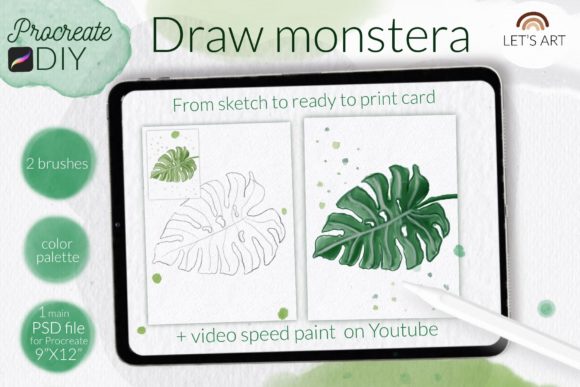
- 1 PSD File: This is the cornerstone of the kit. It is a high-resolution file (9 x 12 inches at 300 dpi) that serves dual purposes. Artists can use it directly in Procreate for drawing, or it can be printed and used as a physical coloring page. The file features a realistic watercolor paper background texture, adding an authentic feel to the digital artwork.
- Reference Image: Included within the file structure is a reference image of a Monstera leaf. This guides proportions and vein structures, ensuring accuracy for those less confident in freehand botanical drawing.
- 2 Specialized Brushes:
- Watercolor Art Brush: Designed to mimic the flow and transparency of real watercolor paint.
- Charcoal Pencil Texture Brush: Adds organic, rough edges and sketch-like details, perfect for outlining or adding depth.
- 1 Color Swatch Set: A curated palette of green tones and complementary colors, eliminating the guesswork involved in color mixing.
- 1 Video Tutorial: A step-by-step guide demonstrating techniques specific to the kit, helping users understand layering and blending.
Practical Application: Creating DIY Watercolor Leaf Cards
One of the most engaging ways to utilize this kit is by creating DIY watercolor leaf cards. These cards are versatile, suitable for greetings, home decor, or even commercial product designs. The process highlights the synergy between the provided assets and user creativity.
To begin, open the provided PSD file in Procreate. The 300 dpi resolution ensures that whether the final output remains digital or is printed physically, the quality remains crisp. Use the reference image on a separate layer to trace or guide your initial sketch. The charcoal pencil brush is ideal here, offering a soft, natural line that mimics traditional sketching pencils.
Once the outline is complete, switch to the watercolor art brush. Select colors from the included green tone swatches. The beauty of digital watercolor lies in layering. Start with light washes to establish the base color of the Monstera leaf. Gradually build up darker greens in the shadows and along the veins. Because this is digital, you can adjust the opacity of your layers, allowing for precise control over the "wet-on-wet" effects that are difficult to master physically.
The included video tutorial is invaluable during this stage, offering tips on how to blend edges seamlessly and how to create the characteristic holes (fenestrations) of the Monstera leaf realistically. Once satisfied, the artwork can be exported as a high-quality PNG or JPEG, ready for sharing or printing.
Technical Setup and Compatibility
To ensure a smooth experience, it is crucial to understand the technical requirements and installation processes for the brushes. The kit is optimized for modern versions of Procreate, but accommodations are made for older devices.
Installing Procreate Brushes
The installation method depends on your iPad’s operating system and the version of Procreate you are using. For most users with recent updates, the process is straightforward. However, for those with Procreate version 4.0 or earlier, or older iPads, a specific manual import method is required.
Note: If you have an older iPad or Procreate version 4.0 or earlier, the standard .brushset file may not be compatible. In this case, you must use the individual .brush files provided in the download folder.
Step-by-Step Installation for Older Versions
- Download the Folder: Save the folder containing the
.brushfiles to a accessible location on your iPad, such as the "Files" app. - Locate the Files: Open the folder and identify the individual
.brushfiles. - Initiate Import: Tap and hold one of the
.brushfiles with your finger or Apple Pencil. - Select Share: From the context menu that appears, choose Share.
- Find Procreate: If the option Open in Procreate is not immediately visible, click on More. Scroll through the list of apps until you find Procreate and select it.
- Verify Installation: Open your project in Procreate. Click on the brush icon at the top right corner. Your new brush should appear in the library, ready for use.
Alternative Method for Newer Versions
For users with updated software, the process is streamlined:
- Open Procreate and navigate to the Brush Library.
- Click on New Collection to organize your new tools.
- Select Import and locate the
.brushsetfile in your downloads. - The entire set, including both the watercolor and charcoal brushes, will install instantly.
The Significance of Structured Creative Kits
In today’s fast-paced digital environment, structured creative kits like the Monstera Procreate Watercolor Kit play a vital role in education and skill development. They reduce the "blank canvas syndrome" that often paralyzes beginners. By providing a constrained set of tools—specific brushes, a limited color palette, and a guided template—the kit encourages focused practice.
This approach aligns with modern educational principles that emphasize scaffolded learning. Users are not thrown into the deep end of infinite possibilities; instead, they are given a safe, structured environment to experiment. This builds confidence and competence, which can then be transferred to more complex, unstructured projects.
Furthermore, the inclusion of a PSD file with a watercolor texture background addresses a common misconception: that digital art lacks texture. By integrating realistic paper textures, the kit demonstrates how digital mediums can emulate tactile experiences, making the final output feel warm and organic rather than cold and sterile.
Conclusion
The Monstera Procreate Watercolor Kit is more than a collection of digital assets; it is a comprehensive tool for artistic exploration. Whether you are looking to create personalized DIY watercolor leaf cards, learn the nuances of digital painting, or simply enjoy the therapeutic process of coloring, this kit provides everything needed to start. With its high-resolution templates, specialized brushes, and clear installation instructions for all device types, it empowers users to blend the charm of traditional botany with the flexibility of modern technology. By leveraging these resources, artists of all levels can cultivate their skills and produce stunning, professional-quality botanical art.