Strategic Pixel Creation: Leveraging the Procreate Pixel Art Brush Set for Digital Design
In the rapidly evolving landscape of digital illustration, the choice of tools often dictates not just the aesthetic outcome, but the efficiency and scalability of a creative workflow. For designers, illustrators, and content creators operating within the Apple ecosystem, the Procreate Pixel Art Brush Set represents more than a collection of digital stamps; it is a strategic asset for producing retro-inspired visuals with modern precision. Whether you are developing assets for indie video games, crafting engaging social media graphics, or designing personalized stationery, understanding how to integrate these specialized brushes into your workflow can significantly enhance your output quality and consistency.
This article explores the practical applications of this brush bundle, moving beyond basic functionality to examine how it supports broader creative and business goals. We will discuss when to deploy these tools, how to maintain artistic integrity while leveraging automation, and the strategic considerations necessary for maximizing return on investment in your digital toolkit.
Defining the Tool: Beyond Simple Aesthetics
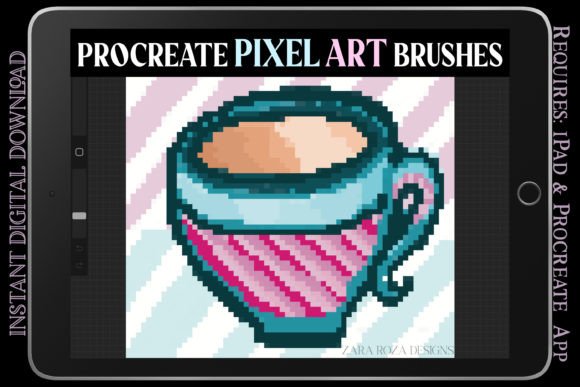
The Procreate Pixel Art Brush Set is a comprehensive bundle designed specifically for larger-sized canvases, addressing a common pain point for pixel artists who wish to work at higher resolutions without sacrificing the authentic "blocky" feel of 8-bit, 16-bit, or 32-bit art. Unlike standard brushes that may blur or anti-alias edges, this set ensures crisp, defined pixels, which is crucial for maintaining the clarity required in sprite sheets, visual novel elements, and arcade-style gaming art.
The collection includes a diverse range of variations: simple pixel brushes for foundational drawing, unique pixel glitch brushes for contemporary, distorted effects, and specialized lettering brushes for typography. This versatility allows creators to pivot between styles—from grunge minimalist landscapes to intricate kawaii portraits—without switching software or importing external assets. For professionals, this consolidation of tools reduces friction in the design process, allowing for faster iteration and experimentation.
Strategic Applications in Branding and Content Creation
For entrepreneurs and marketers, visual consistency is paramount. The retro vintage video game aesthetic has seen a resurgence in popularity, appealing to nostalgia-driven demographics and standing out in saturated digital feeds. Utilizing the Procreate Pixel Art Brush Set enables brands to create distinctive visual identities that resonate with specific audience segments.
- Social Media Engagement: Twitch stickers, Instagram posts, and Twitter headers benefit from the high-contrast, recognizable style of pixel art. The glitch brushes, in particular, offer a way to create dynamic, eye-catching thumbnails that signal creativity and technical savvy.
- Product Differentiation: Small business owners selling digital planners, scrapbooking templates, or printable invitations can use these brushes to create unique, hand-drawn elements that distinguish their products from generic clip-art competitors. Think of pixelated birthday cards, wedding invitations, or festive holiday art for Christmas and New Year campaigns.
- Content Series Continuity: For bloggers and publishers, using a consistent set of pixel brushes for illustrations ensures that all visual assets across a series of articles or guides feel cohesive. This reinforces brand recognition and professional polish.
Enhancing Productivity in Game Development and Animation
For game developers and animators, time is a critical resource. The Procreate Pixel Art Brush Set streamlines the creation of characters, sprites, and background elements. By providing pre-configured pixel clusters and aesthetic variations, the bundle reduces the manual effort required to achieve uniform pixel sizes and spacing.
Consider the workflow for creating a visual novel or an indie platformer. Artists can rapidly sketch concepts, refine character sprites, and design environmental tiles using the same toolset. The inclusion of brushes suitable for 64-bit pixel art allows for greater detail in larger projects, bridging the gap between traditional low-resolution pixel art and modern high-definition expectations. Furthermore, the ability to draw pixelated animations directly in Procreate facilitates quick prototyping of movement and action sequences, enabling faster feedback loops during development.
Expanding Creative Horizons: From Stationery to Storyboarding
While often associated with gaming, the utility of this brush set extends into various other creative domains. Educators can use pixel art to teach grid-based logic and design principles. Freelancers can offer specialized services such as custom pixel portraits for anniversaries, Valentine’s Day gifts, or baby shower invitations. The tactile feel of drawing on an iPad Pro, combined with the precision of these brushes, makes it an ideal medium for digitally hand-drawn invitations and party layouts.
Storyboarding and comic framing also benefit from the rapid sketching capabilities of pixel brushes. Artists can quickly block out scenes, establish composition, and iterate on narrative flow without getting bogged down in detailed rendering early in the process. The minimalist nature of pixel art forces a focus on shape and silhouette, which are fundamental to effective visual storytelling.
Risks and Considerations: Avoiding Generic Outputs
While the Procreate Pixel Art Brush Set offers significant advantages, relying on it without a clear strategic vision can lead to generic or disjointed results. The ease of applying pixel effects can tempt creators to prioritize style over substance. To mitigate this risk, consider the following guidelines:
- Define Your Aesthetic Goals: Before starting a project, determine whether a grunge, clean, or glitch aesthetic best serves your message. Use the appropriate brush variation intentionally rather than randomly experimenting.
- Maintain Resolution Consistency: Ensure that your canvas size aligns with the intended output. While these brushes work on larger canvases, mixing different pixel scales within a single piece can look unintentional unless done for specific artistic effect.
- Balance Automation with Hand-Drawn Nuance: Use the brushes as a foundation, but add manual adjustments to preserve the human touch. Over-reliance on preset clusters can make artwork feel sterile or repetitive.
- Contextual Relevance: Not every brand or project benefits from a retro gaming aesthetic. Evaluate whether pixel art aligns with your target audience’s expectations and your overall brand positioning.
Technical Requirements and Implementation
It is essential to note that this is a digital download requiring the Procreate app on an iPad or iPad Pro. There are no physical items shipped. Users must ensure their hardware and software are up to date to support the brush files effectively. The instant access nature of the product allows for immediate integration into existing workflows, making it a low-risk investment for testing new stylistic directions.
For those new to digital planning or iPad illustration, the learning curve is manageable due to Procreate’s intuitive interface. However, mastering the nuances of pixel art—such as dithering, color limitation, and anti-aliasing—requires practice. The brush set provides the tools, but the artist must supply the skill and strategic intent.
Long-Term Value and Skill Development
Investing in specialized tools like the Procreate Pixel Art Brush Set contributes to long-term skill development. By working within the constraints of pixel art, artists sharpen their understanding of form, color theory, and composition. These foundational skills are transferable to other digital art forms, enhancing overall artistic versatility.
Moreover, building a portfolio that includes pixel art can open doors to niche markets in game development, web design, and digital marketing. As the demand for retro-inspired content continues to grow, having a robust set of tools and the proficiency to use them strategically positions creators for sustained opportunities.
Conclusion: Intentional Creativity
The Procreate Pixel Art Brush Set is more than a novelty; it is a versatile instrument for modern digital creators. By approaching its use with strategic intent—aligning tool selection with project goals, audience expectations, and brand identity—artists and entrepreneurs can leverage this bundle to produce high-quality, distinctive work. Whether you are designing a twitch overlay, illustrating a children’s book, or prototyping a game character, the key lies in thoughtful application. Happy drawing, but more importantly, draw with purpose.