Master Your Astro Art with Zodiac Procreate Stamps
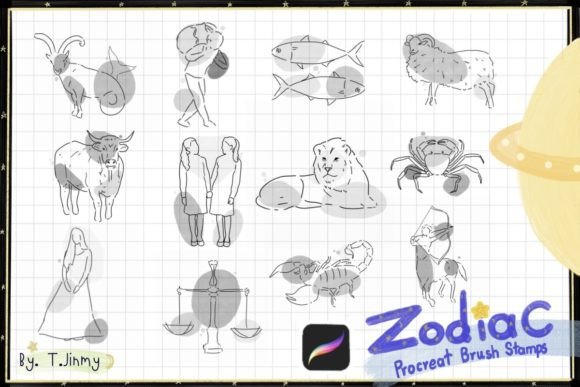
Digital illustration has evolved from a niche hobby into a robust professional industry, yet the barrier to entry for high-quality assets remains a challenge for many. Whether you are designing a brand identity, creating social media content, or illustrating a children’s book, consistency and speed are often just as important as raw artistic talent. This is where specialized tools like the Zodiac Procreate Brush Stamp collection become invaluable. Rather than spending hours drawing complex celestial symbols from scratch, artists can leverage pre-made, hand-drawn assets to enhance their workflow. This set includes twelve individual stamps, each representing a sign of the zodiac, offering a blend of artistic integrity and practical utility.
Understanding the Toolset
The Zodiac Procreate Brush Stamp is not merely a static image library; it is a dynamic set of brush tools designed specifically for the Procreate ecosystem. Each of the twelve stamps is hand-drawn, ensuring that they retain the organic, textured feel of traditional media rather than the sterile look of vector graphics. Because they are implemented as brushes, they offer significant flexibility. Users can mix and match designs, scale them up or down without losing quality, and adjust color, opacity, and blending modes to suit their specific canvas needs.
It is crucial to understand the technical requirements before purchasing or downloading. These brushes are engineered exclusively for the iPad environment. To use them effectively, you need an iPad, an Apple Pencil, or a compatible pressure-sensitive stylus, along with the Procreate app. It is important to note that these files do not work in Photoshop, Illustrator, or any other desktop-based application. This specificity ensures that the brushes interact correctly with Procreate’s unique rendering engine, providing a seamless experience for mobile creators.
Why Different Creators Value Zodiac Assets
The appeal of the Zodiac Procreate Brush Stamp varies significantly depending on your role in the creative process. What matters to a freelance graphic designer may differ entirely from the priorities of a hobbyist journaler. Understanding these distinctions can help you determine if this tool aligns with your current projects.
For Professional Designers and Entrepreneurs
For small business owners and marketing professionals, time is a finite resource. When creating seasonal campaigns, horoscope-themed social media posts, or branded merchandise, the ability to produce high-quality visuals quickly is essential. The primary value here is efficiency. Instead of commissioning a custom illustration for every zodiac-related post, a marketer can use these stamps as foundational elements. They can be resized, recolored to match brand guidelines, and layered with typography. The commercial value lies in the consistency of the hand-drawn style, which adds a human touch to digital marketing materials, making them feel more authentic and less corporate.
For Educators and Content Creators
Educators, bloggers, and publishers often need visual aids to explain complex or abstract concepts. Astrology, while popular, often requires clear, recognizable symbols to engage readers. A teacher creating a presentation on cultural history or a blogger writing about personality traits can use these stamps to break up text and add visual interest. The ease of use allows non-artists to create polished-looking graphics. By adjusting the opacity or setting up the stamps in a monochromatic palette, educators can ensure the visuals support the content without distracting from the educational message.
For Hobbyists and Journal Enthusiasts
For the casual user, the joy of creation is paramount. Bullet journalers and digital diary keepers often look for ways to personalize their pages without the pressure of perfect freehand drawing. The Zodiac Procreate Brush Stamp offers a low-stakes way to add decorative elements to daily logs. A hobbyist might use the stamp corresponding to their birth sign as a header for their monthly spread. The ability to change colors means the same stamp can fit a pastel spring theme one month and a dark, moody winter aesthetic the next. For this audience, the tool is less about commercial output and more about personal expression and creative play.
Practical Applications and Flexibility
The versatility of these brushes extends beyond simple stamping. Because they are fully scalable and editable, they can serve multiple functions within a single project. Consider a wedding invitation designer who wants to incorporate subtle astrological compatibility details into their suite. They can scale the stamps down to use as delicate watermarks behind the text. Alternatively, a tarot card creator might use the stamps as central icons, enlarging them and adding texture overlays to create a mystical atmosphere.
The hand-drawn nature of the stamps is a key differentiator. In a digital world saturated with perfect geometric shapes, organic lines stand out. These imperfections add character and warmth. When you mix and match these stamps with other Procreate brushes—such as watercolor washes or charcoal textures—you can create composite images that look traditionally made. This flexibility allows for a high degree of creativity, enabling users to move beyond the default appearance of the stamp.
Installation and Setup Guide
Getting started with your new brushes is straightforward, but following the correct steps ensures a smooth integration into your library. You will receive one ZIP file containing the twelve Zodiac Procreate Brush Stamp files. Before you begin, ensure you have unzipped the file on your iPad.
- Download and Locate: Download the files to a folder on your iPad. Open the Files app and navigate to the folder where the download was saved.
- Initiate Import: Find the downloaded brush files. Tap and hold on the file with your finger or Apple Pencil to bring up the context menu.
- Share to Procreate: Select “Share” from the menu options. If you see “Open in Procreate,” tap it directly. If this option is missing, click on “More” to reveal additional apps.
- Select App: Scroll through the list of applications, find Procreate, and select it. This action should automatically import the brushes into your Procreate collection.
- Verify Installation: Open your project in Procreate. Click on the brush icon at the top right corner. Look for the new brush set in your library. You should also find any included palettes if they were part of the package.
If the automatic import does not work, you can manually import the brushes by opening Procreate, tapping on a brush set, and selecting “Import” from the dropdown menu. However, the “Open in Procreate” method is generally the most reliable for ZIP packages.
Making the Right Choice for Your Workflow
When evaluating whether the Zodiac Procreate Brush Stamp is right for you, consider your primary goals. If you prioritize speed and need consistent, high-quality astrological symbols for commercial or personal projects, this tool is an excellent investment. It removes the technical hurdle of drawing complex symbols while retaining artistic flair. However, if you require vector-based scalability for large-format print outside of the iPad ecosystem, or if you do not use Procreate, this tool will not meet your needs.
For those who value learning and skill development, these stamps can also serve as reference material. By studying the line work and composition of the hand-drawn signs, beginners can learn how to balance negative space and line weight in their own illustrations. Ultimately, the value of these brushes lies in their ability to bridge the gap between professional-quality design and accessible, user-friendly technology. Whether you are a seasoned illustrator looking to streamline your process or a beginner eager to decorate your digital journal, these stamps offer a practical, creative solution.