Evaluating Procreate Realistic Lip Gloss Stamps for Digital Illustration
Digital illustration on the iPad has evolved significantly, allowing artists to replicate traditional media textures with increasing fidelity. Among the myriad of tools available for Procreate, specialized stamp brushes have gained popularity for their ability to streamline complex textural details. One such tool is the Procreate Realistic Lip Gloss Stamps set. This resource is designed specifically for digital artists who wish to incorporate high-gloss, reflective lip textures into their character designs, fashion illustrations, or beauty-focused artwork without manually painting every highlight and reflection.
Understanding the utility, limitations, and appropriate use cases for these stamps is essential for artists deciding whether to integrate them into their workflow. This evaluation explores the functionality of the set, its benefits, and the scenarios where it serves as a strong asset versus when alternative methods might be preferable.
What Are Procreate Realistic Lip Gloss Stamps?
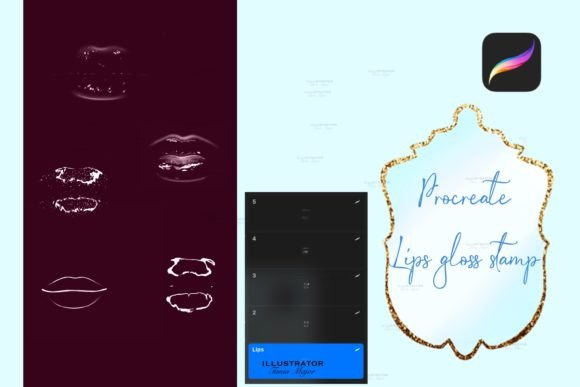
The Procreate Realistic Lip Gloss Stamps is a curated collection of five distinct brush stamps compatible exclusively with the Procreate app on iPad. These brushes are engineered to mimic the visual properties of glossy lip products, including specular highlights, subsurface scattering effects, and wet-looking reflections. The set requires Procreate Version 5 or higher, ensuring compatibility with modern brush engines and layer functionalities within the software.
Unlike standard texture brushes that require continuous strokes, these tools function as stamps. The user interface is straightforward: a single tap on the canvas places the pre-designed gloss shape. This mechanism differs from dynamic brushes that respond to pressure and tilt for stroke variation. Instead, the focus is on precise placement and subsequent customization. Once placed, the artist can manipulate the stamp’s dimensions and color values to suit the specific lighting and tonal requirements of the illustration.
Key Features and Functionality
The core value proposition of this brush set lies in its efficiency and ease of use. The following features define the user experience:
- One-Touch Application: The stamping mechanism allows for rapid deployment of complex gloss shapes. This reduces the time spent on repetitive manual highlighting.
- Customizable Color and Size: While the initial stamp provides a base texture, users retain full control over the hue, saturation, and brightness. Resizing the stamp ensures it fits various lip shapes and perspectives.
- Five Distinct Variations: The inclusion of five different stamps offers variety in reflection patterns. This prevents repetitive visuals when working on multiple characters or diverse angles within a single piece.
- iPad Exclusivity: The file format is optimized for the Procreate ecosystem, ensuring seamless import and performance on iPad devices.
Installation is a standard process for Procreate users. After downloading the brush file directly to the iPad, the artist imports the set into the Procreate app. This simplicity lowers the barrier to entry for users who may not be familiar with advanced brush creation or modification.
Benefits for Digital Artists
For many illustrators, particularly those working in fashion, beauty, or character design, rendering realistic lips is a challenging task. Achieving the interplay of light on a curved, moist surface requires a nuanced understanding of form and reflection. The Procreate Realistic Lip Gloss Stamps address this challenge by providing a reliable baseline.
Time Efficiency is the most immediate benefit. Manually painting realistic gloss involves layering multiple passes of highlights, mid-tones, and shadows. Using a stamp reduces this process to seconds, allowing artists to allocate more time to other aspects of the composition, such as anatomy, clothing textures, or background details.
Consistency is another advantage. When creating a series of illustrations or a comic strip, maintaining a consistent style for lip textures can be difficult when painting freehand. Stamps provide a uniform aesthetic that can help unify the visual language of a project.
Furthermore, these tools serve as an excellent learning aid. By analyzing how the stamp constructs highlights and shadows, novice artists can gain insights into how light interacts with glossy surfaces. This observational learning can eventually translate to improved freehand painting skills.
Considerations and Tradeoffs
While efficient, stamp-based workflows come with inherent tradeoffs that artists must consider. The primary limitation is flexibility regarding perspective and anatomy. A stamp is a static image. If the character’s head is tilted at an extreme angle or the lips are parted in a unique way, the pre-made stamp may not align perfectly with the underlying geometry. In such cases, the artist must spend time warping, erasing, or blending the stamp to fit the form, which can negate some of the time-saving benefits.
Another consideration is artistic originality. Because these stamps are available for purchase and download, there is a risk of recognizable repetition across different artists' works. For professionals seeking a highly unique signature style, relying heavily on stock stamps may dilute their individual artistic voice. It is crucial to modify the stamps—adjusting opacity, blending modes, and adding hand-painted details—to ensure they integrate seamlessly into the specific artwork.
Additionally, the dependency on specific software limits accessibility. Users who work across multiple platforms, such as Photoshop on desktop or Clip Studio Paint, cannot utilize this specific file. It is a tool strictly for the Procreate iPad environment.
Ideal Use Cases
The Procreate Realistic Lip Gloss Stamps are a strong fit for several specific scenarios:
- Fashion Illustration: Speed is often critical in fashion sketching. These stamps allow designers to quickly add polished finishes to model sketches without getting bogged down in minute details.
- Character Design Sheets: When creating turnaround sheets or expression charts, consistency and speed are valuable. Stamps help maintain a uniform look across multiple poses.
- Social Media Content Creation: Artists who produce frequent content for platforms like Instagram or TikTok benefit from the rapid workflow, enabling higher output frequency.
- Beginner Practice: New users struggling with rendering wet textures can use these stamps to achieve professional-looking results while they develop their manual painting skills.
When to Consider Alternatives
There are situations where alternative approaches may be more suitable. If an artist is working on a highly stylized or abstract piece where realism is not the goal, a realistic gloss stamp may look out of place. In such cases, custom brushes that allow for more expressive, painterly strokes might be more appropriate.
For hyper-realistic portraits requiring exact anatomical precision, manual painting remains the gold standard. While stamps can serve as a base, the level of detail required for photorealism often necessitates hand-crafted highlights that respond precisely to the unique contours of the subject’s face.
Artists who prefer a cross-platform workflow should consider creating their own custom brushes in software that supports export across different applications, or investing in brush sets that offer versions for multiple programs.
Making the Decision
Deciding whether to incorporate Procreate Realistic Lip Gloss Stamps into your toolkit depends on your specific workflow needs and artistic goals. If you prioritize efficiency, consistency, and ease of use within the Procreate ecosystem, this set offers a practical solution. It is particularly valuable for artists who frequently render beauty-focused subjects and wish to reduce the technical burden of painting complex reflections.
However, if your work demands extreme anatomical flexibility, unique stylistic deviation, or cross-platform compatibility, you may find the limitations of static stamps restrictive. In these instances, investing time in mastering manual rendering techniques or exploring dynamic texture brushes may yield better long-term results.
Ultimately, these stamps are best viewed as a supplementary tool rather than a replacement for fundamental drawing skills. They excel when used as a starting point or a time-saving shortcut, provided the artist applies further customization to ensure the final result aligns with the unique vision of the illustration. By balancing the convenience of automation with the nuance of manual adjustment, digital artists can effectively leverage this resource to enhance their creative output.